
2OaksGo · The cutover command center
Know the real go-live time, not the one you wrote weeks ago.
2OaksGo is a live cutover command center. Keep your plan tool; run the go-live in 2OaksGo. It re-forecasts the finish time whenever work runs late, so executives and the war room see the same true position.
- Plan
- Rehearse
- Countdown
- Go-live
- Hypercare
- Shaped by banking core migrations, built by 2Oaks Consulting
- Rehearse on the same tool you will use on the night
- An executive view you can read at a glance
Thank you. We have your note.
Someone at 2Oaks will reply to the email you gave us. If you do not hear from us, check your spam folder or write to info@2oaksconsulting.com.
When a go-live slips, executives are the last to know.
The plan sits in MS Project, trackers in Excel, updates in Teams and hourly status calls. By the time the numbers reach the top, they are already stale.
A missed window can mean customers locked out, regulators asking questions and a rollback nobody rehearsed.
A spreadsheet holds the plan you wrote weeks ago. It cannot tell you what a two-hour overrun does to everything downstream.
The people who could fix the slip are pulled into status updates, and rehearsals teach you things the next plan never uses.
What your executives see.
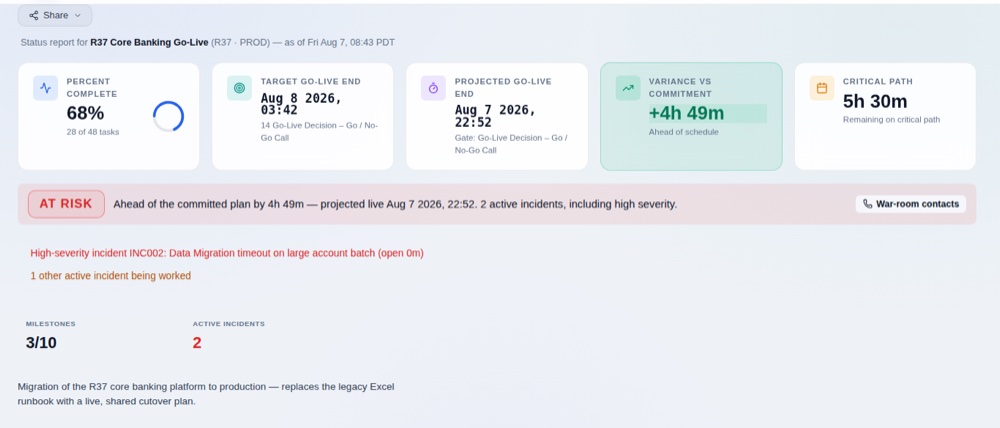
One executive dashboard: where the go-live will land, how far that is from the commitment, what is on fire and what is due next. Then a regular status update, on the cadence you set, so nobody has to ask.
Sample data from a banking core migration. Here the schedule is ahead of plan, but a high-severity incident correctly turns the status to At Risk.
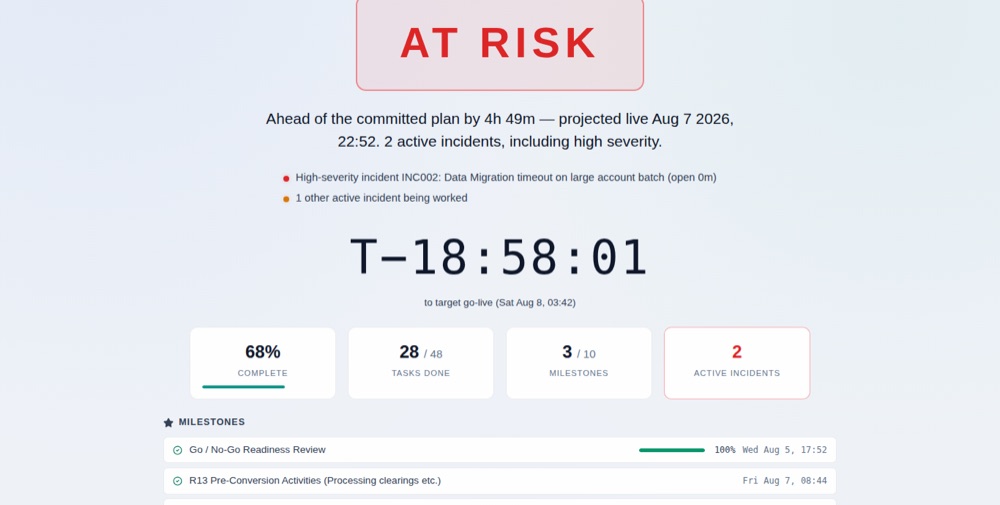
And for everyone else: the broadcast page.
A read-only page for the wider team, on a wall screen or a phone: one status, one sentence and a countdown to go-live.
One live plan, from first rehearsal to hypercare.
Everything in 2OaksGo serves one promise: at any moment, every stakeholder knows the true schedule position.
Executive dashboard and regular updates
Executives get one summarized view of the whole go-live, plus status updates on a regular cadence, so they can see how it is going without asking.
A broadcast page for everyone else
A read-only page with one status, one sentence and a countdown, for a wall screen or a phone. Post an update to Microsoft Teams from the tool, or print a status pack.
A forecast that never goes stale
The finish time is recomputed on every change, so one overrun re-forecasts the go-live straight away. What is driving a slip is always clear, so everyone knows which task to fix.
Plan, actuals and forecast in one view
See what you planned, what has actually happened and where the go-live is forecast to land, side by side on every task. Together they give you a true picture of current status. The forecast is computed for you, never typed.
Go / Hold / Abort gates
Flag any task as a checkpoint and record the decision. It shows on the Gantt and on the broadcast page.
Comprehensive incident and decision logging
Incidents and decisions each have their own lifecycle, incidents show how long they have been open, and every new run starts with a clean register.
Rehearse on the real tool
Dress rehearsals use the same setup as go-live. An admin can set a shared clock to view the plan at any chosen moment. Recorded actuals can seed your next run, only when you choose to.
Fits the way you already plan.
You do not have to start from a blank page.
Bring your plan in
Import from MS Project or ProjectLibre as XML, and export back out. Keep editing the plan in the tools your team knows.
Everyone on the same page
From executives to technical contributors, everyone sees and works from the same plan. Executives get the executive view; project managers and contributors get the project view with tasks and the Gantt chart. No endless time spent translating between layers. Saves are conflict-protected when two people edit at once.
Built to de-risk critical go-lives.
For any organization with a go-live that has to land: a fixed date, many dependencies and a lot at stake.
Teams running the cutover
Programme leads, conversion leads and release managers who need one war-room view and a dependable forecast.
Organizations with a critical go-live
If a late task can put the go-live at risk, and many tasks depend on each other, this is for you.
Executives who need to act
CIOs, COOs and sponsors who need to see early where the go-live is slipping, so they can decide and act while there is still time.
2OaksGo is shaped by banking core migrations. If your go-live is something else, tell us about it in the form. We will say plainly whether it fits.
Questions we expect.
What happens after I submit the form?
A member of the 2Oaks team reads your note and replies by email. If 2OaksGo is not the right fit for your go-live, we will say so.
Do I need to replace MS Project?
No. You can import your plan from MS Project or ProjectLibre XML and export it again. 2OaksGo is for running the live event, not only for drawing the plan.
What does an executive see?
Executives get a dedicated executive view: a summarized picture of the whole go-live, with the forecast finish, how far it is from plan, active incidents and what is due next. They also get regular status updates from the command center. Everyone else can watch a separate read-only broadcast page. Both sit behind the same sign-in as the rest of 2OaksGo, so executives need an account to open them.
How do the people doing the work use it?
Contributors work from a task list and a Gantt chart, with full task management: owners, dependencies, actual times and incidents. A “My Work” view cuts the plan down to your own tasks and their neighbours, including on a phone.
How do we manage shifts?
2OaksGo has shift management: a roster and schedule for who is on, so coverage and handoffs are visible in the same plan as the work.
How do we keep everyone informed?
Each audience gets its own view. Executives have their executive view and regular status updates. The wider team has the broadcast page. Project managers and contributors work in the project view. You can also post an update to Microsoft Teams from the tool, or print a status pack.
Will 2Oaks help with my go-live?
Yes. 2Oaks can set up the tool for you and run your cutover with our expert project managers.
What does my data look like on this form?
We keep your name, email, business name and message so we can reply. We do not sell your details. Read the privacy policy.